1
/
of
3
Brand:Linkhare
Linkhare Wireless Router, Multi-Port Gigabit Ethernet Home Internet Router, Long Range High Speed WiFi Router, Plug & Play Easy Setup Router for Home & Small Office
Linkhare Wireless Router, Multi-Port Gigabit Ethernet Home Internet Router, Long Range High Speed WiFi Router, Plug & Play Easy Setup Router for Home & Small Office
Regular price
$78.59 USD
Regular price
Sale price
$78.59 USD
Shipping calculated at checkout.
Quantity
Couldn't load pickup availability
Brand:Linkhare
Type:Wireless routers
Interface: Multiple Gigabit Ethernet RJ45 Port
Standard: Wi-Fi 5
Power Supply: Matching dedicated power adapter
Application: Home / Small Office Network
Date First Available:July 13,2026
- Advanced Wi-Fi 5 High-Speed Network Technology
Wi-Fi 5 standard brings improved transmission efficiency, lower latency and stronger anti-interference. Enjoy buffer-free 4K/8K streaming, lag-free online gaming and clear video conferences even with multiple devices connected.
- Multiple Gigabit Ethernet Ports
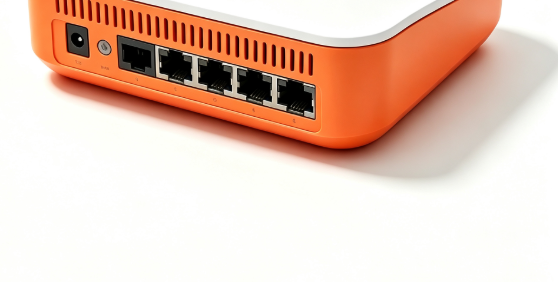
Rich RJ45 gigabit wired ports support stable wired access. You can directly connect computers, game consoles, NAS storage and smart televisions to achieve lossless high-speed wired network access, meeting high-demand networking needs.
- Wide & Stable Long-Range Signal Coverage
Optimized signal architecture expands effective coverage. Reduce dead zones in bedrooms, living rooms and corridors inside apartments and houses, delivering steady Wi-Fi signal across most living spaces.
- Simple Plug & Play Setup
Intuitive web-based setup interface, no complicated professional configuration required. Follow step-by-step guidance to finish network configuration quickly. Suitable for ordinary household users without professional network knowledge.
- Optimized Heat Dissipation Design
Side ventilation groove structure accelerates internal heat exchange. Prevent overheating during long-time continuous operation, keeping network performance stable for all-day use.
- Compact Modern Appearance
Rounded compact body saves desktop space. Fresh two-tone shell design blends well with home, study and small office decoration styles, no bulky industrial look.
Usage & Optimization Tips
- Place the router in an open central position of the house, avoid metal cabinets, thick concrete walls.
- Keep away from microwave ovens, Bluetooth devices and other signal interference sources.
- Restart the router regularly every 7–15 days to maintain stable network performance.
- Log into the management page regularly to update firmware for better compatibility.
Share